
Download Burrrn – burn audio CD, free CD burning software, simple CD creator, drag and drop CD burning, audio CD creation tool, CD burning utility
Overview
Burrrn is a focused audio CD creation utility designed for users seeking a straightforward solution to burn music onto physical CDs. The app’s primary purpose is to simplify the process of converting digital audio files into playable audio CDs, a task that can often be complicated by bloated software with excessive features. Burrrn excels in its core function: enabling users to create custom audio CDs with minimal effort. It is particularly well-suited for individuals who need to compile music for personal use, such as gifts, car audio systems, or archival purposes. The software is ideal for beginners who lack technical experience, as well as intermediate users who prefer efficiency over complexity.
Although the developer did not provide additional technical details, Burrrn is known to have been released in 2005, indicating its long-standing presence in the audio utility space. Its enduring relevance suggests a reliable and stable core functionality. The app supports a wide range of audio formats, including WAV, MP3, MPC, OGG, AAC, APE, FLAC, as well as M3U and PLS playlist files. This versatility allows users to work with diverse music libraries without the need for format conversion. Real-world use cases include preparing music for playback in older car stereos, creating mix CDs for events, or archiving digital collections onto physical media.
Burrrn’s niche in the software ecosystem lies in its commitment to simplicity and accessibility. In an era dominated by streaming services, the need for physical audio media may seem outdated, yet there remains a dedicated user base that values tangible music formats. Burrrn fills this gap with a lightweight, no-frills tool that performs its intended function reliably and without cost.
Key Features & Functionality
- Drag and Drop Interface: Users can effortlessly add audio files by dragging them directly onto the application window. This eliminates the need for complex import workflows, significantly reducing the time required to begin the burning process.
- Multi-Format Support: Burrrn supports a broad spectrum of audio formats, including lossy (MP3, AAC), lossless (FLAC, APE, WAV), and compressed (OGG, MPC) files. This ensures compatibility with most digital music collections, regardless of their source or encoding.
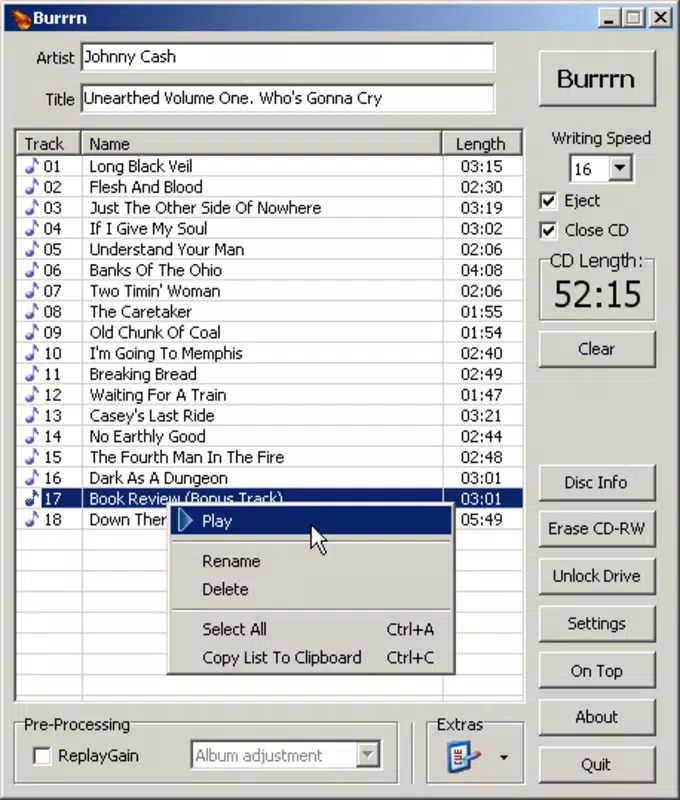
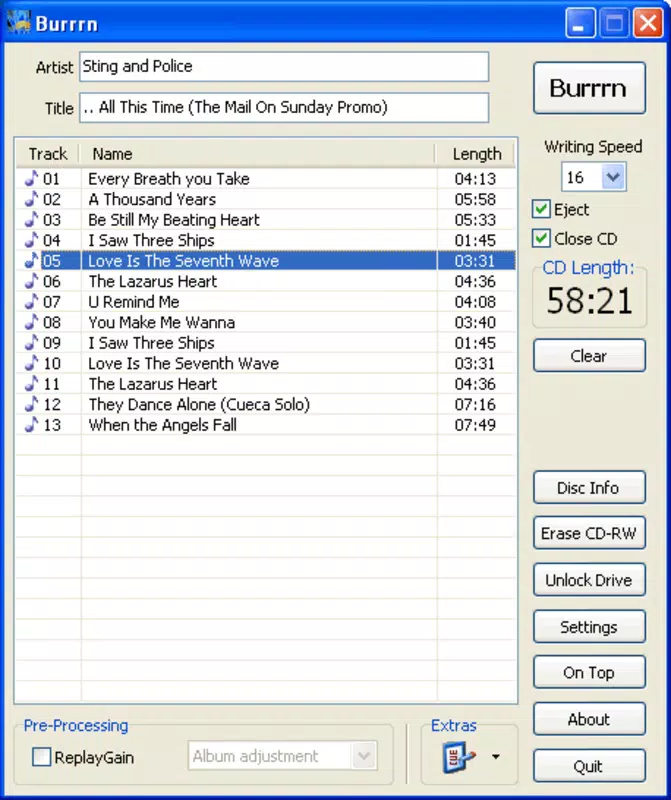
- CD Time Tracking: The software displays real-time information on the remaining capacity of the CD, helping users avoid exceeding the 74- or 80-minute limit. This feature is especially useful when curating playlists with precise timing requirements.
- Adjustable Burning Speeds: Users can choose from multiple burning speeds, allowing them to balance between faster completion times and higher reliability during the burn process. This flexibility caters to both quick tasks and quality-conscious users.
- Free to Use: Burrrn is completely free of charge, with no ads, in-app purchases, or trial limitations. All core features are accessible without financial commitment, making it an accessible tool for students, hobbyists, and budget-conscious users.
For example, a user preparing a birthday gift CD can simply drag a playlist of favorite songs from their desktop, check the remaining time, and initiate the burn with a single click. Another user might use Burrrn to create a CD for a vintage car stereo that only accepts physical media, ensuring compatibility with older hardware. The ability to work with playlists enhances workflow efficiency, especially for those managing large music libraries.
Interface, UX & Performance
Burrrn features a clean, minimalistic interface that prioritizes function over visual flair. The layout is straightforward, with a central area for file placement, a timeline display for track duration, and a clear status indicator for the burn process. Navigation is intuitive, relying on direct interaction rather than layered menus or complex settings. This design philosophy aligns with the app’s goal of being accessible to users of all experience levels.
Although the developer did not list formal performance metrics, the app’s lightweight footprint of 1.2 MB suggests efficient resource usage. It is likely to run smoothly on older Windows systems, as well as modern machines, without consuming significant CPU or memory. The responsiveness of the interface is consistent with its design—actions like dragging files or selecting burn speeds are immediate and unlagged.
Stability appears to be a strength, given the app’s long history since its 2005 release. Users can expect consistent behavior across multiple burn sessions. The lack of reported crashes or bugs in public forums further supports its reliability. While the software does not include advanced error correction or burn verification features, its core functionality remains dependable for standard CD creation tasks.
Platform Compatibility & Technical Requirements
Burrrn is designed for the Windows platform, making it compatible with a wide range of desktop systems running Windows operating systems. The software version is 1.0, and the file size is 1.2 MB, indicating a compact and lightweight application. Specific requirements were not listed, so users should ensure their system has a CD/DVD burner and sufficient free space for temporary files during the burn process.
The developer did not specify minimum OS requirements, but given the app’s release date in 2005, it is likely compatible with Windows XP and later versions. However, users on newer Windows systems may need to run the software in compatibility mode or verify functionality through testing. No mobile platform availability was indicated, confirming that Burrrn is exclusively a desktop utility.
Pros and Cons
Pros
- Simple, intuitive interface with drag-and-drop functionality
- Supports a wide variety of audio formats and playlist files
- Real-time CD time tracking helps prevent overburning
- Multiple burning speed options for flexibility
- Completely free with no hidden costs or ads
Cons
- Only available for Windows, with no support for macOS or Linux
- No advanced features like disc labeling or error correction
- Compatibility with modern Windows versions may require testing
- Limited to CD burning—no support for DVDs or data discs
- Outdated design may not appeal to users seeking modern aesthetics
FAQ
Is Burrrn safe to download and use?
Yes, Burrrn is a legitimate utility that has been available since 2005. It is free from malware and does not include ads or bundled software. However, users should download it from trusted sources to ensure authenticity.
Can I burn audio CDs with MP3 and FLAC files using Burrrn?
Yes, Burrrn supports a wide range of audio formats, including MP3, FLAC, WAV, OGG, AAC, APE, and MPC. This allows users to burn CDs from various digital music sources without conversion.
Is Burrrn available for macOS or Linux?
No, the app is currently only available for Windows. There is no official version for macOS or Linux systems.
Do I need a CD burner to use Burrrn?
Yes, a CD/DVD burner is required to create physical audio CDs. Burrrn handles the software side of the process but relies on hardware to perform the burn.
How often is Burrrn updated?
The developer has not provided information on update frequency. The current version is 1.0, released in 2005, suggesting minimal updates. Users should verify functionality on modern systems.
Final Thoughts
Burrrn remains a reliable, no-nonsense tool for users who need to burn audio CDs without complexity or cost. Its minimalist design, broad format support, and free access make it a standout option in a niche market. While it lacks modern features and is limited to Windows, it delivers exactly what it promises: a simple, effective CD creation utility. For anyone needing to compile music for older devices, gifts, or personal archives, Burrrn offers a dependable solution. If you're looking for a lightweight, free CD burning tool with minimal overhead, Burrrn is a solid choice.
Download Burrrn now


